

A ticket goes missing during the Friday dinner rush.
The expo cannot tell which table ordered the well-done ribeye. The fryer station is three orders behind. Nobody has noticed the delay.
If this sounds familiar, your staff may not be the problem. Your order management system could be.
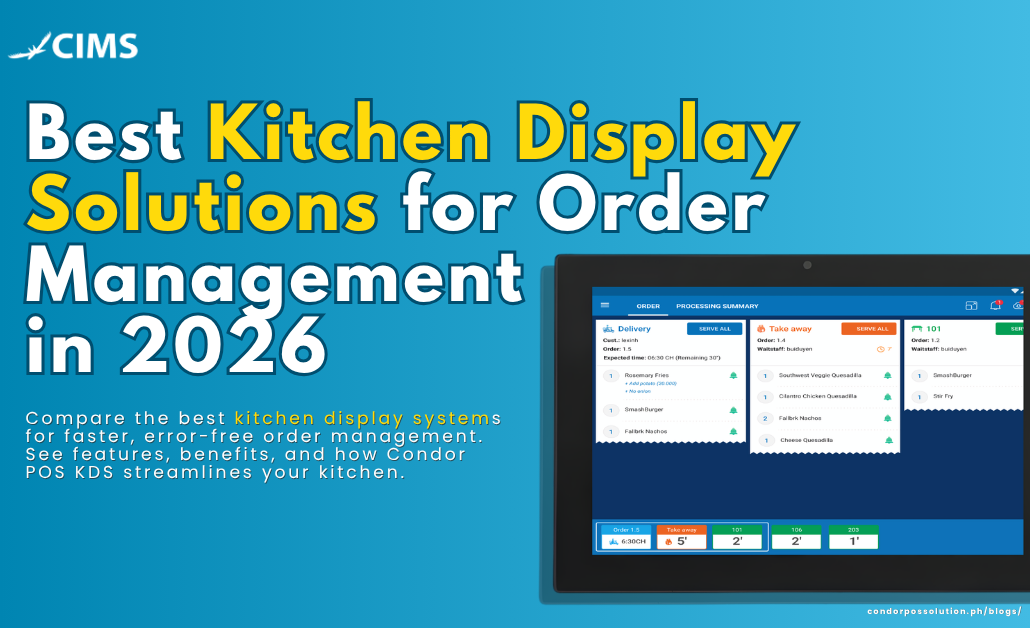
A Kitchen Display System (KDS) can help solve these issues. It replaces paper tickets and handwritten notes with a real-time digital screen.
Every order appears as soon as it is placed. The system sends each item to the correct kitchen station. Staff can then track the order until it is completed.
In this guide, we will explore what a KDS does. We will also cover its key features and benefits. You will also see how leading KDS solutions compare.
Finally, we will explain how the Condor POS Kitchen Display System can improve kitchen order management.
What Is a Kitchen Display System (KDS)?
A Kitchen Display System (KDS) is a digital screen used in restaurant kitchens. It receives orders directly from the point-of-sale system.
This removes the need for paper kitchen tickets. Staff can see orders clearly on screen. They can also view modifiers, allergens, and course information.
The basic order flow looks like this:
POS → KDS → Kitchen Station → Order Complete
A server or online customer places an order through the POS. The order is then sent to the KDS.
The system routes each item to the correct prep station. This may include the grill, fryer, salad, or expo station.
Kitchen staff can mark items as fired or completed. Once the order is finished, the ticket can be removed from the screen.
The completed status can also sync with the front of house. This helps staff know when an order is ready for delivery.
Why Kitchen Display Systems Matter for Order Management
A KDS can improve several parts of restaurant operations. It can help reduce errors and improve communication.
Faster Order Times and Fewer Ticket Errors
Paper tickets can get lost or damaged. They can also be difficult to read during busy periods.
A digital display keeps order information clear. Staff can see the same information across the kitchen.
This can help reduce mistakes. It can also lower the number of remakes, voids, and customer complaints.
Real-Time Sync Between Front of House and Kitchen
Restaurant orders can change after they are placed.
A customer may add a modifier. A server may void an item. A table may also request a rush order.
With a KDS, these updates can reach the kitchen in real time. Staff do not need to rely on verbal messages.
This improves communication between the front and back of house.
Better Multi-Station Coordination
Many restaurants use several kitchen stations. These can include grill, fryer, salad, expo, and dessert.
A good KDS can route each item automatically. The fryer station only sees fryer items. The grill station sees grill items.
The expo station can view the complete order. This makes it easier to coordinate the final plate.
Data and Analytics
Every order processed through a KDS creates useful data.
Restaurants can track average preparation times. Managers can also identify peak service periods.
The system can show which stations are experiencing delays. This information can help managers improve kitchen operations.
Instead of relying on guesswork, managers can use actual order data.
Less Paper Waste
A KDS can reduce the need for printed kitchen tickets.
This can lower the ongoing cost of thermal paper. It can also reduce printer maintenance.
For restaurants focused on reducing waste, this can be an added benefit.
Key Features to Look for in a Kitchen Display Solution
Not every kitchen display system offers the same features.
When comparing KDS solutions, look for the following capabilities:
- Real-time order sync with your POS — Orders should appear as soon as they are placed. Staff should not need to refresh the screen manually.
- Color-coded timers and priority alerts — These help staff identify orders that are taking too long.
- Multi-station routing and bump bar support — Items should go to the correct station automatically. Staff should also have an easy way to complete orders.
- Cloud-based access and remote monitoring — Managers should be able to monitor kitchen performance from a phone or laptop.
- Online and delivery order integration — Orders from websites, apps, and delivery platforms should appear with dine-in orders.
- Customizable order views — Staff should be able to organize orders by station, course, or ticket type.
- Multi-location management — Businesses with several branches should be able to manage kitchens from one dashboard.
Best Kitchen Display Solutions for Order Management
The best KDS depends on your restaurant’s needs.
Kitchen size is an important factor. Order volume and your current POS system also matter.
Here are several well-known KDS options to consider.
Condor POS Kitchen Display System
The Condor POS Kitchen Display System works with the Condor POS front-of-house system.
Orders from dine-in, online, and delivery channels can appear on one screen. The system can also route items to the appropriate kitchen station.
Condor POS is designed for restaurants that need cloud-based reporting. It also supports flexible station routing and multi-location management.
This makes it suitable for restaurants looking to connect front-of-house and kitchen operations.
Toast KDS
Toast’s Kitchen Display System is part of the broader Toast POS ecosystem.
It is designed for high-volume restaurants with more complex kitchen workflows.
The system includes features such as production views and prep station routing. It also supports kitchen productivity reporting and automated firing.
Toast can continue processing certain in-store orders during an internet outage. Online orders may not come through until the connection is restored.
Square KDS
Square’s Kitchen Display System is designed for restaurants already using Square POS.
It can be a practical option for smaller and simpler kitchens. Its setup is generally straightforward.
However, restaurants with complex multi-station workflows may need more advanced routing features.
Lightspeed KDS
Lightspeed’s KDS is designed for restaurants with multiple kitchen stations.
It works closely with the Lightspeed Restaurant POS system. The platform also focuses on kitchen analytics and order-time tracking.
It can be useful for restaurants with more layered kitchen workflows.
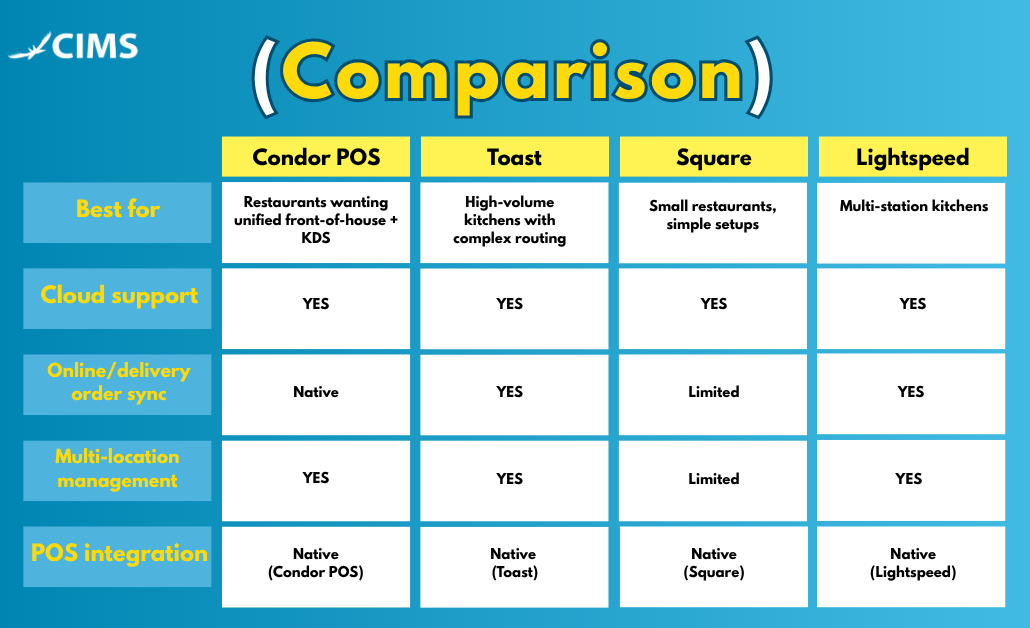
Pricing for each provider varies by plan, screen count, and hardware, so it’s worth requesting a quote directly rather than relying on advertised starting prices.
How to Choose the Right KDS for Your Restaurant
Consider your restaurant type
A quick-service counter, a full-service dining room, and a delivery-only ghost kitchen all put different demands on a KDS. A single-station QSR may only need a simple order queue, while a multi-course fine-dining kitchen needs course-by-course firing and expo coordination.
Check POS compatibility
Some kitchen display systems only work well with their own POS ecosystem. If you’re not planning to switch your point-of-sale system, make sure the KDS you’re evaluating integrates natively rather than through a third-party workaround.
Evaluate hardware requirements
Screens, mounts, and bump bars add to the total cost. Confirm what hardware is included, what’s compatible, and whether it’s built to hold up in a hot, busy kitchen environment.
Look at support, training, and onboarding
A KDS is only as good as your team’s ability to use it under pressure. Ask what onboarding looks like and what support is available during service hours, not just business hours.
Compare pricing models
Some providers bundle KDS into your existing POS subscription; others charge per screen, per month. Weigh subscription costs against one-time hardware purchases to understand the real total cost of ownership.
How Condor POS’s Kitchen Display System Improves Order Management
Condor POS’s KDS was built to solve the exact problems most restaurants run into: disconnected systems, delayed order sync, and kitchens that can’t see the full picture across dine-in, online, and delivery orders.
- Unified order stream — dine-in, online, and third-party delivery orders all appear on the same screen, routed automatically by station.
- Real-time front-of-house sync — when a server makes a change at the table, the kitchen sees it instantly.
- Built-in reporting — track prep times, peak-hour volume, and station bottlenecks without exporting to a separate tool.
- Multi-location dashboard — manage kitchen performance across every location from one place.
Because it’s built natively into Condor POS, there’s no third-party integration to maintain, no separate login, and no lag between when an order is placed and when it appears in the kitchen — which is where most ticket errors and delays start.
A kitchen display system isn’t just a nice-to-have — it’s one of the highest-leverage upgrades a restaurant can make to reduce ticket errors, speed up service, and give managers real visibility into how the kitchen actually runs. When you’re comparing options, prioritize real-time POS sync, reliable multi-station routing, and integration with your online and delivery channels over any single flashy feature.
Condor POS’s Kitchen Display System is built to check all three boxes out of the box, with no third-party workarounds required.
Book a free demo to see how Condor POS’s Kitchen Display System can streamline your kitchen.
