

It is 12:00 PM on a busy payday Friday. In fact, the lunch hour rush is at its peak. A long queue of hungry customers stretches from your counter to the door. Suddenly, your internet connection drops. As a result, the cashier’s screen freezes and loads endlessly. Consequently, the queue stops moving. Customers grow visibly frustrated. Meanwhile, your staff scrambles to write down orders on paper. To prevent this disaster, finding the best offline POS Philippines has to offer is crucial for your store.
Does this scenario sound familiar? If so, you need to ask a critical question. Specifically, does your daily revenue depend entirely on your internet connection?
Choosing the right point of sale system requires understanding your store’s environment. Therefore, this guide explores the core differences between cloud-based and locally installed systems. First, you will learn exactly how each type works. Second, you will see where each system wins. Finally, you will learn how to choose the most reliable platform to keep sales moving.
What Is the Difference Between Offline and Cloud POS?
You must understand your point of sale architecture to make an informed decision. First, know where the software lives. Second, know where your critical business data is stored.
What is a Cloud POS?
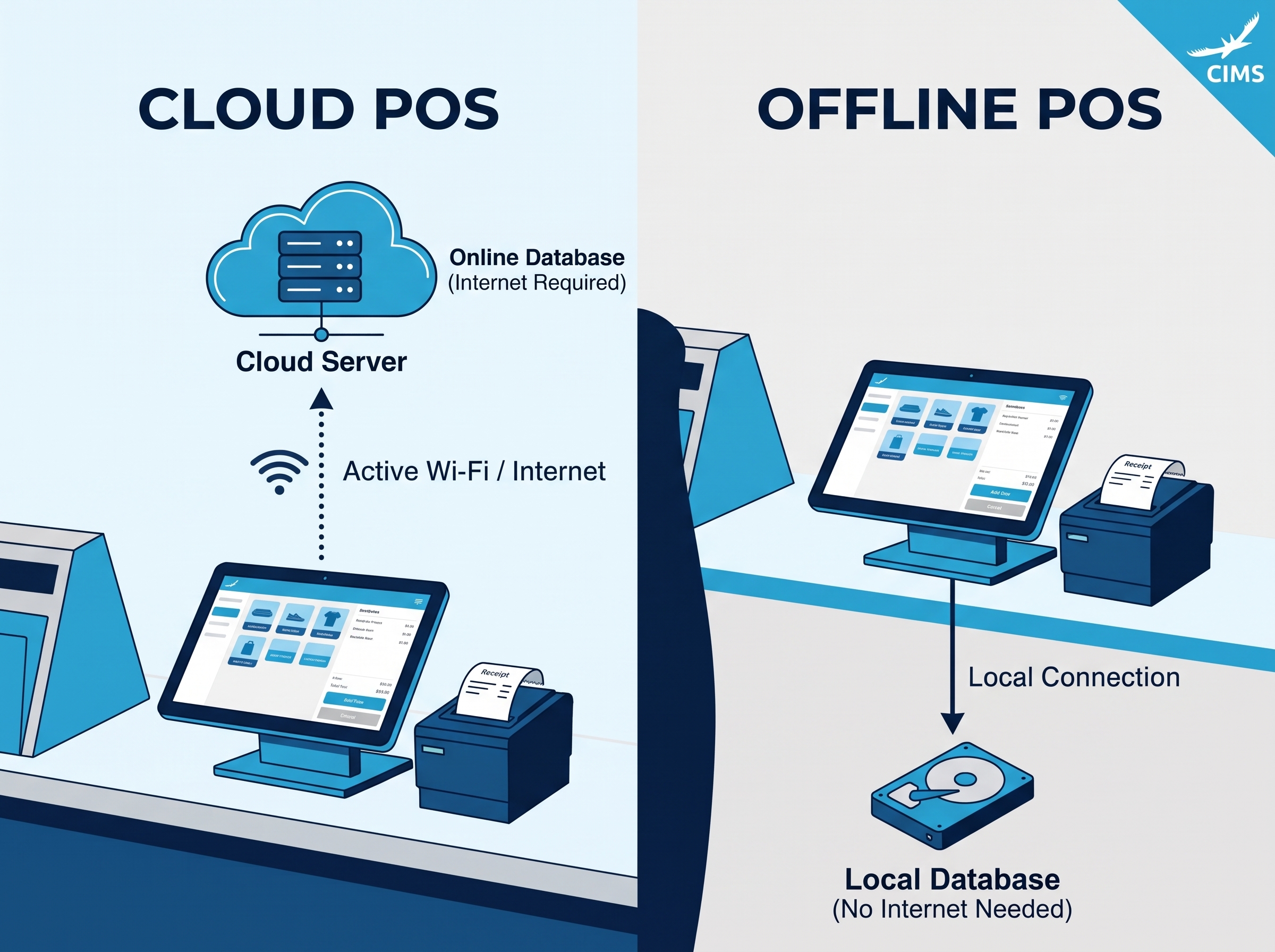
A cloud POS is a web-based system. Specifically, both the software application and your store’s database live online. Furthermore, remote servers host this data. You access the system through a web browser or a cloud-connected app. Every time you scan an item, the terminal sends a request to the cloud. Then, the server fetches the price, updates the inventory, and records the sale.
What is an Offline POS?
An offline POS system is often called a locally installed or Windows-based POS. Here, the software and your entire database install directly onto your store’s computer hard drive. In other words, all the data lives on your own local machine. Therefore, this makes it a true POS that works without internet. It processes sales instantly. Most importantly, it never needs to communicate with an external server.
What Does “Hybrid” Mean?
A hybrid POS attempts to offer the best of both worlds. Initially, it acts primarily as an offline POS. The core database installs locally. Because of this, the cashier can process transactions without an active internet connection. The internet connection eventually restores. Afterward, the system quietly syncs the local data with a cloud server. Consequently, this updates remote dashboards for the business owner.
Why Internet Reliability Matters for Philippine Businesses
Local context is everything when comparing a cloud POS vs an offline POS Philippines system. Indeed, operating a retail store or restaurant in the country means dealing with unpredictable infrastructure.
Inconsistent Connections in Malls and Provinces Many businesses operate inside thick concrete mall structures. Others run in basement food courts or bustling outdoor market stalls. Unfortunately, cellular data (LTE/5G) often struggles to penetrate these areas. In provincial areas, internet service providers (ISPs) suffer from frequent network congestion. Cable cuts are also common. As a result, a system that relies purely on an always-on internet connection becomes a major liability here.
Brownouts and Router Failures Power interruptions remain a persistent issue. For instance, they happen frequently during typhoon season or peak summer months. Your POS terminal might connect to an Uninterruptible Power Supply (UPS) during a brownout. However, your ISP’s street-level infrastructure might lose power. Consequently, this immediately cuts off your internet. Even basic hardware issues can cause problems. For example, an overheating Wi-Fi router can halt your store’s operations if you do not use the best offline POS Philippines offers.
The Actual Cost of POS Downtime Downtime is not just an inconvenience. Rather, it is a direct financial loss. Queues build up when your POS goes down. Additionally, customers abandon their purchases. Staff resort to manual computing. Consequently, this leads to pricing errors and unrecorded inventory.
Consider this downtime calculation. A busy fast-food counter processes 50 transactions an hour. Meanwhile, the average receipt is ₱250. A two-hour internet outage happens during peak lunch service. Consequently, this could result in ₱25,000 in delayed, lost, or unrecorded sales. Therefore, securing an offline POS Philippines solution prevents this exact scenario.
Offline POS: Pros and Cons
When searching for a reliable offline POS Philippines retailers trust, a locally installed system is built for resilience. High-volume retailers prefer this route for several reasons. Below, here is a breakdown of the benefits and trade-offs.
Pros
-
Keeps processing sales during internet outages: Your operations remain completely unaffected by ISP failures. Furthermore, disconnected routers or bad weather will not stop your sales.
-
Lightning-fast transaction speed: The system retrieves prices directly from the local hard drive. Therefore, it does not wait for a network ping. Indeed, this millisecond response time is crucial for busy grocery stores.
-
No monthly internet dependency: You do not need to pay for a premium business internet plan. Instead, your cash register functions perfectly without it.
-
Data stays on your own machine: You have complete control over your business data. Specifically, it is not hosted on a third-party server.
Cons
-
Remote access is limited: The data lives in the store. Because of this, owners cannot simply log into a website from home to see live sales. Instead, you must set up specialized remote desktop tools.
-
You are responsible for backups: The physical hard drive could fail. Therefore, your data can be lost if you have not backed up your files.
-
Updates are installed manually: Software upgrades require a manual download. Sometimes, a technician visit is necessary.
-
Multi-branch consolidation takes more effort: Compiling end-of-day reports from different offline branches takes time. Specifically, managers must export files and email them to the head office.
Cloud POS: Pros and Cons
Cloud systems are highly popular for modern startups. Remote-managed businesses also love them due to their accessibility.
Pros
-
Check sales from anywhere: Business owners can view real-time sales dashboards. For instance, you can check inventory levels from your smartphone at a coffee shop.
-
Automatic updates and backups: The vendor handles all database backups. Additionally, they push new software updates to the system seamlessly via the internet.
-
Easier multi-branch reporting: You might own ten branches. Conveniently, the cloud system aggregates all their data into a single dashboard automatically.
Cons
-
Vulnerable to internet instability: The POS can freeze if the connection drops. As a result, cashiers cannot close receipts or open the cash drawer.
-
Ongoing subscription costs: Most cloud POS vendors charge a recurring monthly fee. Consequently, this becomes significantly more expensive than a one-time software purchase over time.
-
Requires reliable connectivity: You must invest in a highly stable internet connection. Often, you need a secondary backup ISP to get full value.
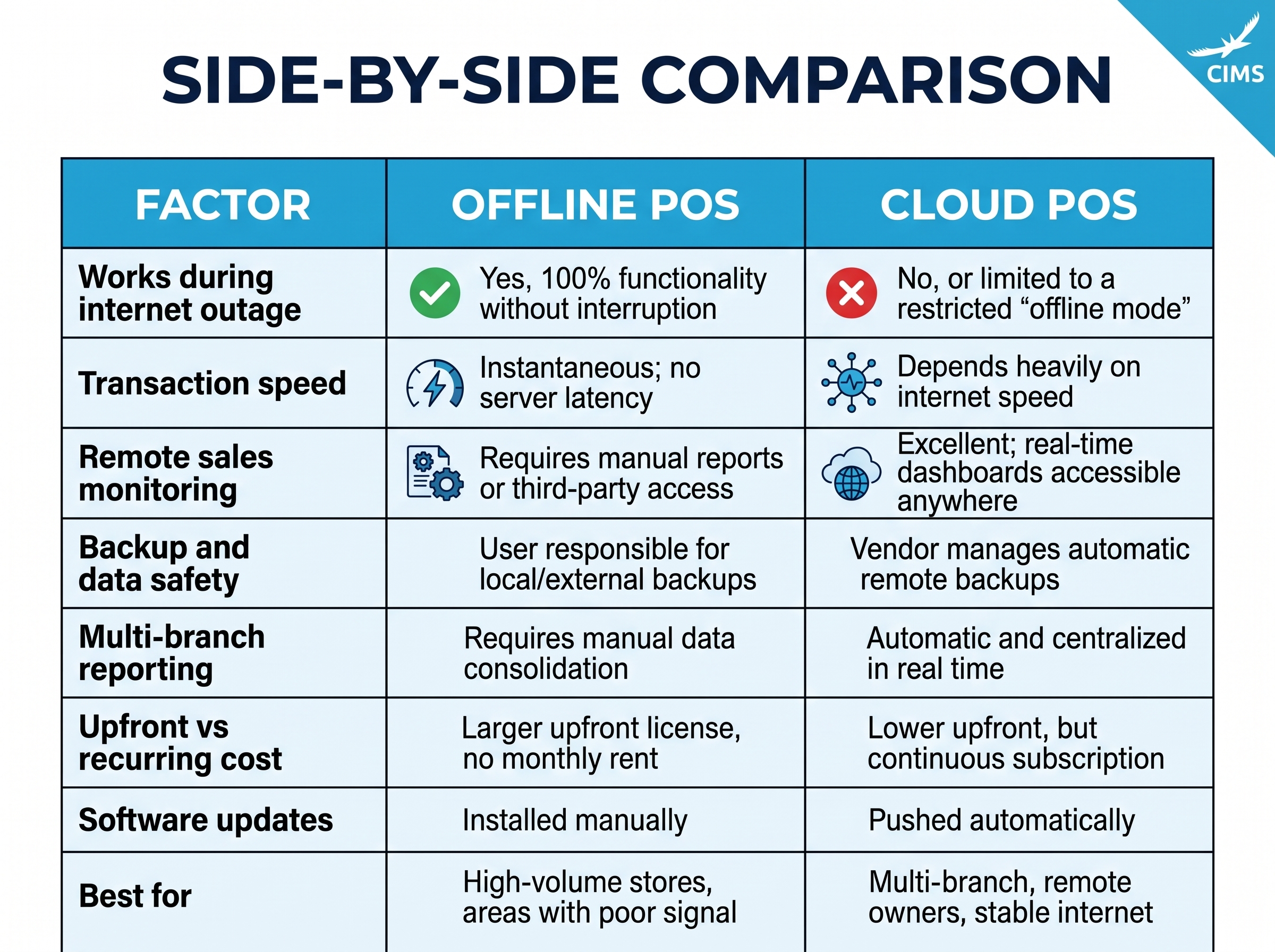
Side-by-Side Comparison
Use this balanced comparison of core operational factors. Ultimately, it will help you decide between an offline setup and a cloud setup.
Which Type Fits Your Business?
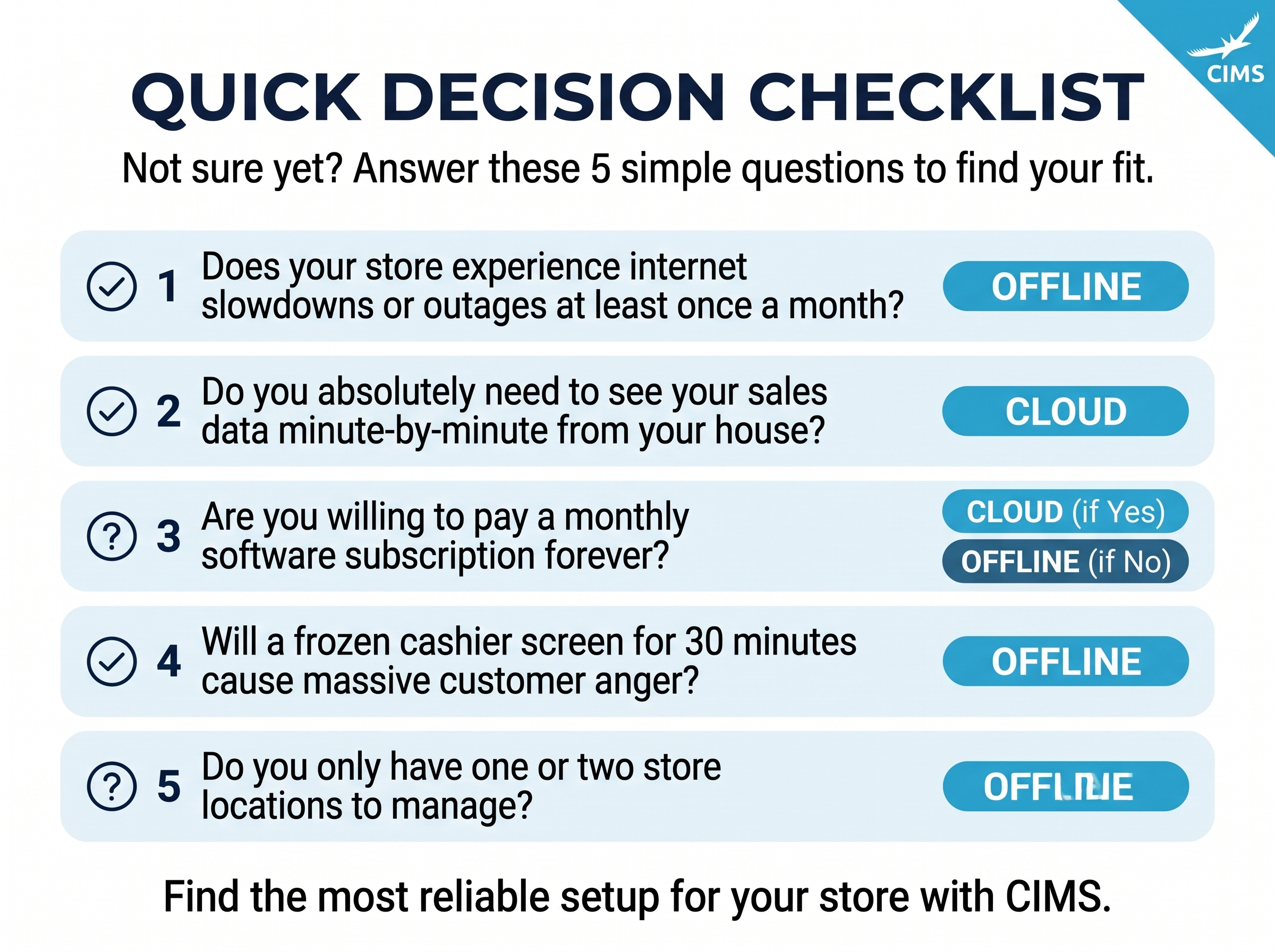
There is no one-size-fits-all answer. Instead, the right choice depends on your operational environment. Your management style and expansion plans also matter.
Choose offline if:
You run a high-volume counter where speed is everything. For example, it is great for hardware stores, groceries, or fast-food stalls. It is also the best choice if your physical location suffers from unstable signals. If you want the most stable offline POS Philippines software, choose this if you prefer to buy outright without monthly fees.
Choose cloud if:
You manage several branches remotely. Additionally, you prioritize having real-time analytics on your mobile phone. Overall, it is ideal if you operate in modern areas with enterprise-grade internet.
Consider hybrid if:
You want the unshakeable reliability of an offline terminal. However, you still want your data to sync to an online dashboard eventually.
How to Get the Best of Both Worlds
You can choose a highly reliable offline POS and still use modern management workflows. To do this, you just need to establish a few simple standard operating procedures (SOPs).
-
Implement Routine Data Backups: Do not rely solely on the main hard drive. Instead, connect a small external hard drive. Then, set a daily schedule to export your database.
-
Automate End-of-Day Reporting: Instruct your closing manager to generate PDF sales reports. Afterward, have them email the files directly to you every evening.
-
Invest in Backup Power: Your POS doesn’t rely on the internet. Therefore, you just need a reliable UPS to survive a power outage. Consequently, this keeps the local terminal running during brownouts.
-
Create a Consolidation Routine: Use a standard Excel template for multiple branches. Next, have each branch manager input their daily totals and email them to the head office.
For more tips on optimizing your closing procedures, read our full guide on End-of-Day Closing and Inventory Tracking.
How Condor POS Handles This
We prioritize operational stability above all else at Condor POS. Indeed, downtime is unacceptable in the Philippine retail and restaurant sectors. For this reason, our core systems are engineered as highly reliable offline POS Philippines solutions. Our products include Condor All-in-One, Future POS, and CIMS POS.
Condor POS ensures that your cashiers can ring up items quickly. Furthermore, they process cash payments and print receipts at maximum speed. It works perfectly whether your internet is fast, slow, or completely down. Therefore, this makes it the perfect solution for hardware stores and supermarkets.
Honest Trade-Offs and Solutions Condor POS operates offline for maximum stability. Because of this, you cannot simply log into a website to view live sales. However, we bridge this gap by offering robust end-of-day reporting tools. Specifically, store managers can easily generate shift reports and email them to owners. Our team can also consult with you to configure secure remote-desktop access.
Talk to our team about the setup that fits your exact store environment. Ultimately, we will build a resilient system that protects your revenue from connectivity issues.
Frequently Asked Questions (FAQ)
Can a POS really work without internet?
Yes. A locally installed POS stores its entire product database on the store’s computer hard drive. Therefore, it requires zero internet connectivity to process cash sales or print receipts.
Is offline POS safe from data loss?
It is safe from cloud server hacks. However, it is vulnerable to physical hardware failure. Consequently, business owners must perform daily backups to an external drive to prevent data loss.
Can I still see my sales reports remotely with an offline POS?
Not in real-time by default. The store manager must export the daily sales report and email it to you. Alternatively, you must set up a secure third-party remote desktop application.
Is cloud POS cheaper than offline POS?
Cloud POS usually has a cheaper upfront cost. However, the continuous monthly subscription fees add up over time. This often makes it significantly more expensive over a span of 3 to 5 years.
What happens to my data if my computer breaks?
You will need to restore your data from your most recent backup if your hard drive crashes. With a cloud POS, the data is safe online. You simply log in on a new device.
Can I switch from one type to the other later?
Yes, but it requires a software migration. You can export your inventory list from an offline POS and upload it to a new cloud system. However, historical sales data is often difficult to transfer.
Find the Most Reliable Setup for Your Store
The right choice between an offline and a cloud POS comes down to local internet connectivity. The number of branches you manage also plays a huge role.
A robust locally installed system is usually the safest investment for Philippine retailers. It guarantees maximum uptime and high-speed transactions. The cloud offers unmatched convenience if you manage a franchise with highly stable internet.
Do not let slow internet dictate your revenue. Equip your cashiers with a system that never stops working.
Request a free demo of Condor POS today. Our experts will evaluate your store’s layout and connectivity. We will recommend the most reliable hardware and software package for your needs.
Request a Free Demo | Contact Our Team
