

In the Philippines, the “ber” months change how people shop. Christmas bonuses, 13th month pay, and a calendar full of sales send shoppers flooding into malls, groceries, pharmacies, and neighborhood stores. For store owners, that is the best news of the year, and also the biggest test. A dependable POS system for retail stores in the Philippines is what keeps that surge from turning into long lines, wrong prices, and empty shelves.
When checkout slows down, shoppers walk away. When stock runs out of your best gift items, the sale goes to the store down the street. A reliable POS, backed by the right hardware, is often the difference between a record December and a chaotic one.
Why the Holiday Season Puts Retail Stores Under Pressure
The holiday rush is not just “more of the same.” It changes how your store runs every day, and each change creates a new place for things to go wrong.
Sudden spikes in foot traffic and basket size
Shoppers buy more per visit in December. Families stock up for Noche Buena, office workers buy gifts in bulk, and pharmacies see a rise in vitamins and seasonal medicines. More items per basket means more scans, more receipts, and more chances for a queue to build.
Gift buying, bundles, and last-minute shoppers
Gift sets, bundles, and “buy more, save more” offers are everywhere. Last-minute shoppers add pressure in the final days before Christmas, when patience is lowest and lines are longest.
Heavy discounts and promos running at the same time
Christmas sales, 11.11, 12.12, and store-specific promos often overlap. Senior citizen and PWD discounts apply on top of that. If prices are updated by hand, mistakes are almost guaranteed.
Temporary cashiers and extended store hours
Many stores hire seasonal staff and stay open longer. New cashiers need a system they can learn in a day, not a week, and longer hours mean your equipment has to keep up without breaking down.
These four pressures are the ones a good POS is built to handle. Here is how.
7 Ways the Right POS Helps Retailers During the Holidays
1. Faster checkout and shorter lines
Speed is the first thing customers notice. With barcode scanning, quick item lookup, and fast receipt printing, each transaction takes less time. Shorter transactions mean shorter lines, which means fewer abandoned baskets and happier customers. It also makes each cashier more productive, which matters when you are working with seasonal staff.
2. Accurate pricing, promos, and discounts
Holiday pricing is complicated: sale prices, buy-one-take-one deals, bundles, vouchers, and SC/PWD discounts. A POS that stores these rules in the system means cashiers do not have to compute discounts in their heads. The result is fewer errors, fewer customer disputes, and less revenue lost to mispriced items.
3. Real-time stock tracking to avoid stockouts and overstock
Nothing hurts a December like running out of your fastest-moving items in the second week. A POS with inventory tracking shows what is selling and what is running low, so you can reorder before the shelf is empty.
What that looks like depends on your store:
- Supermarkets and convenience stores: holiday groceries, snacks, drinks, and gift packs
- Pharmacies: vitamins, seasonal medicines, and fast-moving health products
- Specialty retail: gift items, seasonal goods, and limited-run stock
- Meat shops: holiday cuts and weighed items that sell out quickly
Low-stock alerts and sales history also help you avoid the opposite problem: overbuying items that will not move once the season ends.
4. Flexible payments
Shoppers pay in different ways, and the holidays add gift certificates and vouchers to the mix. A POS that handles cash, cards, e-wallets, gift certificates, and split payments keeps the counter moving, because the cashier does not have to improvise when a customer pays with two methods.
5. Compliance without the headache
The busiest weeks are the worst time to worry about paperwork. A POS that produces official receipts, end-of-day (Z) reports, and BIR-ready records takes that pressure off your team. Requirements can change, so confirm the latest BIR rules with your provider and the BIR itself before the season starts.
6. Sales reports that guide decisions
Your POS records every sale, which makes it one of the best planning tools you have. Daily reports show your best-sellers, your peak hours, and how each cashier is performing. Use that information mid-season to:
- Schedule more staff during your busiest hours
- Restock the items that are actually selling
- Adjust or end promos that are not working
7. Loyalty and customer retention
Holiday shoppers include many first-time customers. Capturing customer details and rewarding repeat purchases gives them a reason to come back in January. Ask your POS provider which loyalty and customer features are available for your setup.
Don’t Forget the Hardware: What Your Store Needs for Peak Season
Software is only half of the system. At the counter, your POS is only as reliable as the equipment connected to it. Here is a quick checklist of what a busy retail store typically needs:
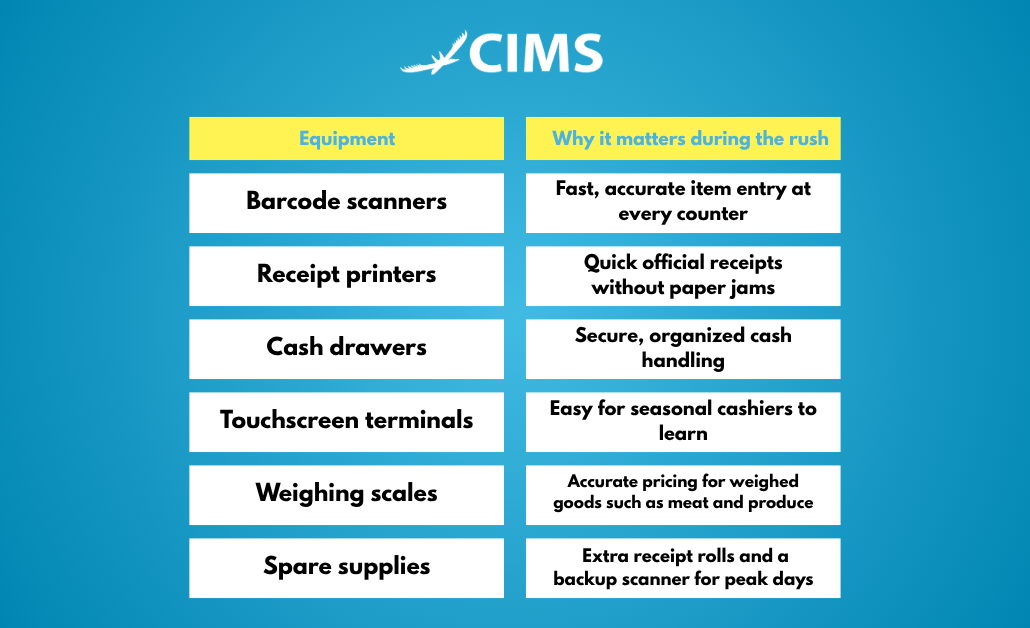
A backup plan matters as much as the equipment itself. Keep spare receipt rolls on hand, know who to call if a device fails, and test everything before the first big sale.
This is where working with a provider that supplies both software and hardware helps. Condor POS Solutions offers POS hardware and peripherals alongside its software, so setup and support come from one team instead of several vendors pointing at each other.
What Happens When Your POS Fails on a Busy Day?
Imagine a Saturday in mid-December. The store is full, the queue reaches the door, and one terminal freezes. Cashiers start writing prices by hand. Customers sigh and check their phones. Some leave their baskets and walk out.
That single bad hour has costs that last longer than the hour itself.
Lost sales and abandoned carts
Every shopper who leaves the line is a sale you will not get back, and during the holidays, many of them will not return.
Pricing and inventory errors that take weeks to fix
Manual workarounds create mistakes. Wrong prices and missing stock records can take weeks to reconcile, often right when you need accurate numbers for year-end.
Frustrated staff and customers
Stressed cashiers make more errors, and unhappy customers remember the experience. In a season built on goodwill, that is expensive.
How to Choose a Holiday-Ready Retail POS
If you are comparing options, look for these qualities:
- Speed and stability under heavy transaction volume
- Ease of use, so seasonal cashiers can learn it quickly
- Strong inventory, pricing, and promo tools
- Reliable local operation when internet is slow or unavailable (ask the provider to confirm how the system behaves)
- BIR-compliant receipts and reports
- Responsive local installation and support
That last point is easy to overlook. When something breaks in the middle of December, you need people who can respond quickly, not a ticket in a queue.
How Condor POS Supports Retail Businesses
Condor POS Solutions RP Inc. provides point-of-sale systems for a wide range of Philippine retailers, including specialty retail, supermarkets, convenience stores, pharmacies, and meat shops. Its CIMS system is designed for these store types, and the company also supplies the hardware and peripherals that go with it.
Here is how that maps to the holiday challenges above:
- Long lines: barcode-based checkout and receipt printing built for busy counters
- Promo and discount errors: pricing handled in the system instead of by the cashier
- Stockouts: inventory tracking that shows what is selling and what is running low
- Compliance stress: receipts and reports designed for Philippine retail requirements
- Equipment problems: hardware and software from a single provider
Want to see it in your own store? Talk to our team or request a free demo.
Retail POS Holiday Preparation Checklist
Use this timeline to get your store ready, whether you are starting early or catching up.
6–8 weeks before the rush
- Audit your POS, hardware, and stock data
- Clean up item records and prices
- Replace or repair any failing equipment
3–4 weeks before
- Load promo prices and discount rules
- Train seasonal staff on the system
- Run test transactions at every counter
During peak weeks
- Review sales and stock levels every day
- Keep spare receipt rolls and a backup scanner nearby
- Adjust staffing based on peak-hour reports
After the rush
- Analyze your sales reports
- Identify best-sellers and slow movers
- Plan January restocking
Frequently Asked Questions
Why is a POS important for retail stores during Christmas?
A POS speeds up checkout, keeps prices and discounts accurate, tracks stock, and records every sale. During the holidays, when traffic and promos peak, those functions protect your sales and reduce costly mistakes.
How early should I upgrade my POS before the holiday rush?
Ideally 6 to 8 weeks before, which leaves time for setup, training, and testing. If you are starting later, focus first on the basics: stable checkout, correct prices, and trained cashiers.
Can a POS prevent stockouts during peak season?
A POS cannot restock your shelves, but it shows what is selling fast and what is running low, so you can reorder before you run out.
What hardware do I need for a busy retail store?
Most stores need barcode scanners, receipt printers, cash drawers, and a terminal at each counter. Stores that sell by weight also need scales. Keep spare supplies on hand for peak days.
Is it too late to install a POS in November or December?
It is tighter, but not impossible. Talk to your provider about a faster setup focused on the essentials, and plan your staff training around it.
Conclusion
The holiday rush rewards stores that can move fast and stay accurate. A reliable POS delivers faster checkout, correct pricing, better stock control, smoother compliance, and the sales data you need to make good decisions mid-season. Paired with dependable hardware and local support, it protects both your holiday sales and the customer loyalty that carries into the new year.
Get your store holiday-ready with Condor POS. Contact us for a free consultation.
