

Imagine a customer walking into your hardware store looking for a specific size of bolt. Your staff checks the shelves, searches through storage boxes, and looks at the inventory logbook, only to discover that nobody knows whether the item is still available. For hardware store owners, situations like this can happen every day. Managing thousands of products with different sizes, brands, prices, and measurements can quickly become overwhelming, especially when inventory is tracked manually.
This is where a POS for hardware stores becomes valuable.
A Point of Sale (POS) system helps hardware businesses organize product information, manage inventory, process transactions, and monitor sales through one centralized platform. With the right system, hardware store owners can spend less time checking inventory records and more time serving customers and growing their businesses.
Why Hardware Stores Struggle with Inventory
Unlike typical retail businesses, hardware stores often carry thousands of products that look similar but have different specifications. From screws and electrical supplies to plumbing materials and construction tools, every item needs to be properly recorded and monitored.
Here are some common inventory challenges hardware stores experience.
1. Thousands of Similar Products
Hardware stores often sell products that differ only in size, material, brand, or grade.
For example, a store might carry several types of screws with different lengths and thicknesses. Without proper product organization, employees may accidentally select the wrong item or struggle to locate the correct stock.
2. Different Units of Measurement
Hardware products are not always sold individually.
Some materials are sold by piece, box, kilogram, meter, or roll. This makes inventory management more complicated because the same product may be purchased and sold using different units.
3. Frequent Supplier Price Changes
The cost of construction materials and hardware supplies can change depending on suppliers and market conditions.
When prices are updated manually, employees may forget to change product records, resulting in incorrect selling prices or reduced profit margins.
4. Slow-Moving and Fast-Selling Products
Some hardware products sell almost every day, while others remain on shelves for months.
Without reliable sales reports, business owners may continue purchasing slow-moving products while frequently running out of popular items.
5. Errors in Manual Inventory Tracking
Using notebooks or spreadsheets may work for a small inventory, but managing thousands of products manually increases the risk of missing entries, incorrect quantities, and inconsistent records.
These problems can affect customer satisfaction, daily operations, and overall profitability.
What Is a POS for Hardware Stores?
A POS for hardware stores is a system designed to help hardware retailers manage sales transactions, product inventory, pricing, and business reports. Unlike a traditional cash register, which mainly records sales and payments, a POS system can connect each transaction to inventory records.
For example, when a cashier sells five pieces of a particular bolt, the system can automatically deduct the quantity from the recorded stock. A hardware-focused POS may also support barcode scanning, multiple units of measurement, product variations, and supplier management.
These capabilities make it easier to handle complex hardware inventories without relying entirely on manual records.
For a more detailed comparison, read our related guide: POS System vs. Traditional Cash Register.
Key Features to Look for in a Hardware Store POS
Choosing the right hardware store POS system in the Philippines requires understanding which features can support your daily operations. Not every POS system offers the same capabilities, so hardware retailers should evaluate their business needs before selecting a solution.
1. Fast SKU and Barcode Management
A Stock Keeping Unit (SKU) is a unique code used to identify and track a particular product. For example, two bolts with different sizes should have separate SKUs even if they belong to the same product category.
A POS with effective SKU management allows employees to search products using names, codes, or barcodes. Some systems also support bulk product imports and barcode generation, reducing the need to enter thousands of items individually.
2. Multiple Units of Measurement
Hardware stores frequently sell the same product using different measurements. For example, electrical wires may be sold by meter or roll, while screws may be sold individually or by box.
A multi-unit pricing POS can simplify these transactions by allowing different selling units and, where supported, automatically converting quantities into a common inventory unit. This helps maintain consistent stock records regardless of how customers purchase products.
3. Product Variants and Categories
Organizing products into categories makes inventory easier to manage. For example, a hardware store can create categories for electrical supplies, plumbing materials, paints, construction tools, and fasteners.
Within each category, products can be grouped according to brand, size, color, or material. A structured product catalog helps employees locate items quickly and reduces confusion between similar products.
4. Retail and Wholesale Pricing
Hardware stores often serve different types of customers, including homeowners, contractors, and wholesale buyers. A POS system with tiered pricing can allow businesses to assign different selling prices based on customer type or purchase quantity.
For example, a contractor purchasing 100 pieces of a product may receive a different price from a customer purchasing only five. This reduces manual price calculations and supports more consistent pricing.
5. Real-Time Inventory Tracking
One of the most useful capabilities of hardware inventory management software is automatic stock monitoring. When products are sold, received, or adjusted, the system can update their recorded quantities.
Low-stock alerts can also help employees identify products that need replenishment before they become unavailable.
6. Supplier and Purchase Order Management
Hardware businesses commonly purchase products from multiple suppliers. A POS with purchasing features can help organize supplier information, record product costs, create purchase orders, and track received deliveries.
This provides better visibility into purchasing activities and makes supplier price comparisons easier.
7. Customer Accounts and Credit Tracking
Some hardware stores allow trusted contractors or regular customers to purchase materials on credit, commonly known as utang. A system with customer account management can help record outstanding balances, payment histories, and credit transactions.
This reduces the risk of forgotten payments and makes customer balances easier to review.
8. Quotations and Delivery Receipts
Contractors and construction companies often request quotations before purchasing large quantities of materials.
A POS with quotation and delivery documentation features can help staff prepare estimates, record approved orders, and organize delivery details.
9. Sales and Profit Reports
Sales reporting helps business owners understand which products generate the most revenue. Useful reports may include daily and monthly sales, best-selling products, slow-moving inventory, and profit margins.
These insights support better purchasing decisions and inventory planning.
How to Organize Thousands of SKUs Effectively
Even with a reliable POS system, proper inventory organization is essential. A clear product structure makes it easier to locate items, monitor stock, and maintain accurate records. Here’s how you can organize thousands of SKU’s effectively:
Create a Consistent Product Naming System
Product names should contain important details such as product type, size, brand, and material.
For example:
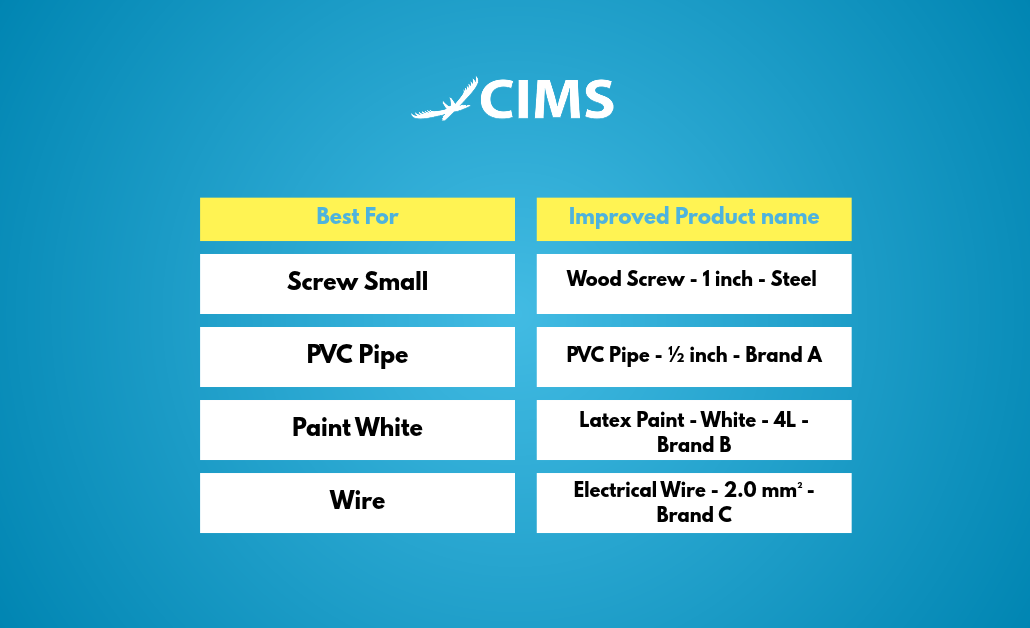
Consistent names help employees distinguish similar items during inventory searches and checkout.
Use Categories and Subcategories
Organize products into clear groups such as Plumbing, Electrical, Paint, Tools, and Fasteners. Each category can have subcategories to make searches more specific.
For example, Electrical may contain Wires, Switches, Outlets, and Circuit Breakers.
Assign Unique Product Codes
Every distinct product variation should have its own SKU or internal product code.
Barcodes can then be assigned to make product identification faster and reduce manual encoding errors.
Set Reorder Levels
Fast-selling products should have minimum stock levels. For example, if a particular PVC fitting sells frequently, the store can set a reorder point based on its average demand and supplier delivery time.
This helps reduce unexpected stock shortages.
Conduct Regular Inventory Counts
Instead of waiting for a yearly inventory count, hardware stores can perform smaller, scheduled cycle counts.
Frequently sold or high-value products can be checked more often to identify discrepancies before they become larger problems.
Step-by-Step Guide to Setting Up a Hardware Store POS
Implementing a POS system for hardware becomes easier when the process is divided into manageable steps.
Step 1: Prepare and Import Your Product List
Organize existing product information in an Excel or CSV file. Include product names, SKUs, categories, units, prices, and available stock quantities. Import the file if your chosen POS supports bulk uploading.
Step 2: Configure Categories, Units, and Prices
Group products into appropriate categories and assign the correct selling units. Set retail and wholesale prices when applicable.
Step 3: Assign and Print Barcodes
Generate or register product barcodes and attach labels to applicable products or storage locations.
Step 4: Verify Opening Inventory
Conduct a physical stock count and compare the results with your imported inventory list before starting live transactions.
Step 5: Train Your Employees
Teach cashiers and stockroom staff how to search products, process sales, receive stock, and correct inventory records.
Step 6: Monitor and Improve Operations
Review sales and inventory reports weekly. Use the results to adjust reorder levels, update prices, and improve product organization.
Benefits of Using a POS in a Hardware Store
Investing in a suitable POS system can improve several areas of hardware store operations.
- Faster Checkout and Better Customer Service – Barcode scanning and searchable product catalogs help cashiers process transactions more efficiently. Employees can spend less time checking prices and more time assisting customers.
- Fewer Stock Shortages and Excess Inventory – Accurate inventory records and reorder alerts help store owners identify products that need restocking while avoiding unnecessary purchases.
- Better Control Over Inventory Losses – Recorded sales, stock adjustments, and inventory counts make it easier to identify missing products and investigate discrepancies.
- More Accurate Profit Monitoring – Sales and cost reports can help owners compare product performance and understand which items contribute most to profitability.
- Improved Business Records – Digital transaction histories make daily sales reviews and record organization easier. For Philippine businesses, it is also important to verify that the chosen POS and receipt setup meet applicable Bureau of Internal Revenue (BIR) requirements.
Why Choose Condor POS for Your Hardware Store?
Simplify your hardware store operations with Condor POS Solutions, an all-in-one POS system designed to make inventory management, sales, and daily transactions easier.
- Smart Inventory Management: Track stocks in real time, manage SKUs, and receive low-stock alerts.
- Fast and Easy Checkout: Speed up transactions with barcode scanning and secure payment options.
- Sales Reports & Analytics: Monitor sales, best-selling products, and business performance.
- Flexible POS Solutions: Choose between cloud-based and offline-capable server-based systems.
- BIR-Compliant Solutions: Support business recordkeeping with BIR-ready receipts and reporting.
- 24/7 Customer Support: Get reliable assistance from Condor’s dedicated local support team.
Frequently Asked Questions About Hardware Store POS Systems
How much does a POS for a hardware store cost?
The cost depends on the software provider, subscription or licensing model, required hardware, and included features. Request a quotation that covers setup, training, support, and any recurring fees.
Can a POS handle thousands of hardware products?
Yes. Many inventory-focused POS systems are designed to manage large product catalogs. However, actual performance depends on the system’s capacity, configuration, and product database.
Can I import my existing inventory list into a POS?
Many POS systems support importing product information from Excel or CSV files. Confirm the required file format and available import options with your provider.
Does a hardware store POS work without internet?
Some POS systems offer offline transaction capabilities, while others require a stable internet connection. Ask the provider how sales and inventory records are handled during connectivity interruptions.
Can I sell the same product by piece and by box?
Yes, if the POS supports multiple units of measurement and inventory conversion. For example, selling one box containing 100 screws can deduct 100 pieces from the underlying stock record.
Simplify Hardware Store Management with the Right POS
Managing thousands of products does not have to mean dealing with complicated inventory records, slow checkout processes, and constant stock discrepancies.
A reliable POS for hardware stores can help organize SKUs, track inventory, manage pricing, and provide useful sales information through one system.
By choosing software that fits your business needs, you can improve daily operations, serve customers more efficiently, and make better inventory decisions.
Ready to Make Hardware Store Management Easier?
Discover whether Condor POS is the right fit for your business. Request a product demonstration to explore its available features and how they can support your store’s daily operations.
Request a Free Demo of Condor POS — contact the Condor POS team to confirm availability and schedule a demonstration.
